
 Image 1 of 1
Outstanding project management depends on more than great design—it depends on making sure the right people complete the right tasks at the right time.
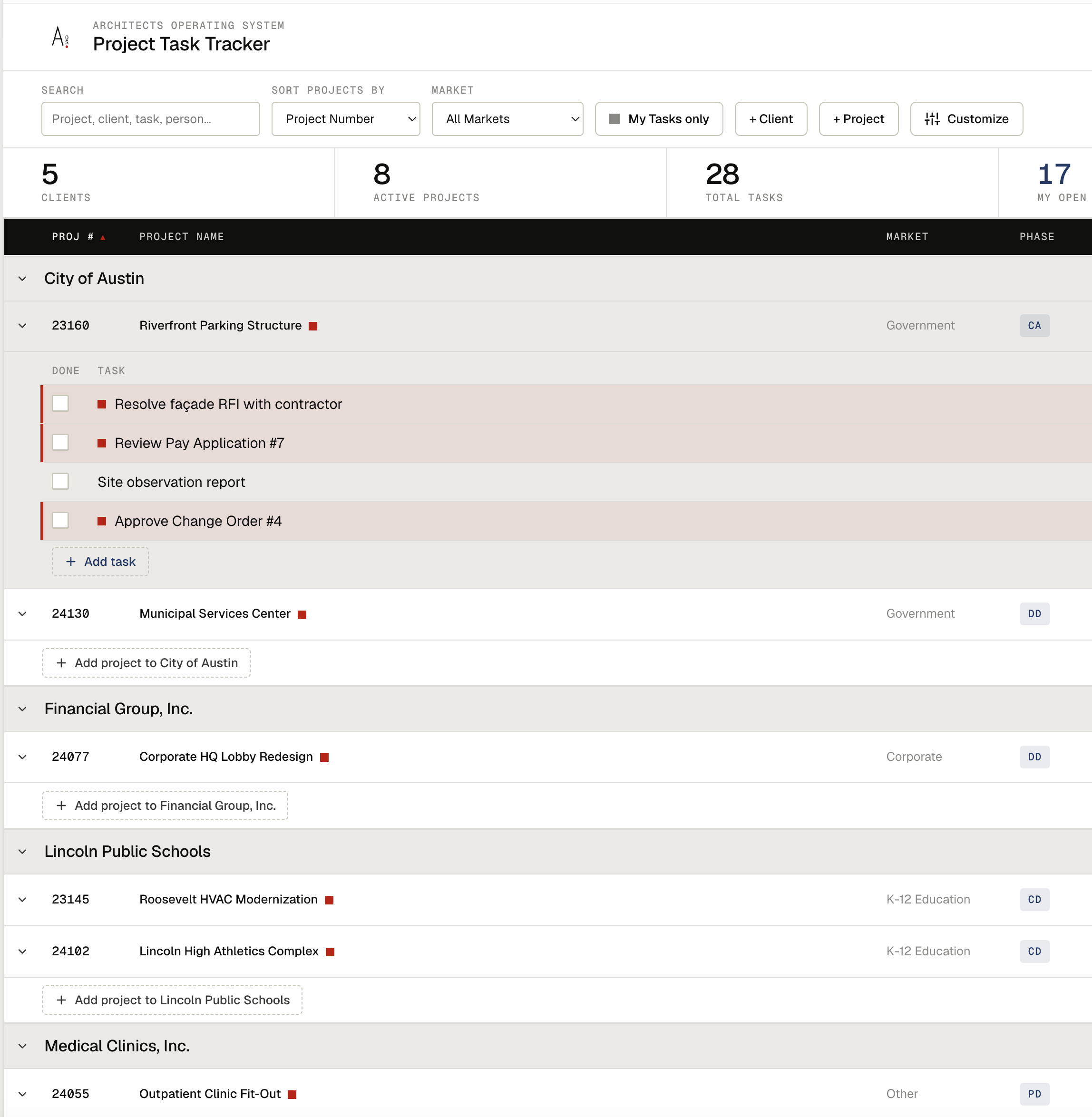
The AOS Project Task Tracker is a fully customizable project management tool that helps architecture and engineering teams organize, assign, prioritize, and monitor project tasks across your entire firm. Whether you're managing a single project or dozens simultaneously, this powerful Excel-based tracker provides a centralized system for keeping work organized and ensuring nothing falls through the cracks.
Designed specifically for design professionals, the Project Task Tracker gives project managers and firm leaders the ability to filter and sort tasks by client, project, project manager, or market sector, making it easy to monitor workloads, identify bottlenecks, and improve team accountability.
Instead of relying on scattered notes, email threads, or multiple spreadsheets, your team gains a single source of truth for project task management.
Organize and Track Tasks By:
Client
Project
Project Manager
Market Sector
Team Member
Task Category
Priority Level
Due Date
Status
Completion Date
Assign and Monitor:
Task Responsibility
Priority (Critical, High, Medium, Low)
Target Completion Dates
Current Status
Progress Notes
Outstanding Action Items
Follow-Up Requirements
Included in the Toolkit:
Interactive Project Task Tracker (Microsoft Excel)
Customizable Task Database
Filter and Sort Dashboard
Priority and Status Tracking
Team Assignment Worksheet
Overdue Task Report
Project Action Item Log
Setup and Customization Guide
Who It's For:
Project Managers
Project Architects
Project Engineers
Studio Leaders
Operations Managers
Firm Principals
Administrative Teams
Benefits:
Create clear ownership for every task
Improve accountability across project teams
Track deadlines before they become missed deadlines
Monitor workload across multiple projects and markets
Quickly identify overdue or high-priority action items
Reduce communication gaps and forgotten commitments
Keep projects moving with greater confidence and consistency
Why AOS?
Design firms don't struggle because they lack talented people—they struggle when important tasks become disconnected from clear ownership and accountability.
The AOS Project Task Tracker provides a simple, scalable system that keeps projects organized and teams aligned. With customizable filters, intuitive tracking, and real-time visibility into task status, your firm can spend less time searching for information and more time delivering exceptional work.
Whether you're leading a five-person studio or coordinating dozens of active projects, this tool helps create a culture of accountability, transparency, and follow-through.
Every task. Every deadline. Every project. Accounted for.
Outstanding project management depends on more than great design—it depends on making sure the right people complete the right tasks at the right time.
The AOS Project Task Tracker is a fully customizable project management tool that helps architecture and engineering teams organize, assign, prioritize, and monitor project tasks across your entire firm. Whether you're managing a single project or dozens simultaneously, this powerful Excel-based tracker provides a centralized system for keeping work organized and ensuring nothing falls through the cracks.
Designed specifically for design professionals, the Project Task Tracker gives project managers and firm leaders the ability to filter and sort tasks by client, project, project manager, or market sector, making it easy to monitor workloads, identify bottlenecks, and improve team accountability.
Instead of relying on scattered notes, email threads, or multiple spreadsheets, your team gains a single source of truth for project task management.
Organize and Track Tasks By:
Client
Project
Project Manager
Market Sector
Team Member
Task Category
Priority Level
Due Date
Status
Completion Date
Assign and Monitor:
Task Responsibility
Priority (Critical, High, Medium, Low)
Target Completion Dates
Current Status
Progress Notes
Outstanding Action Items
Follow-Up Requirements
Included in the Toolkit:
Interactive Project Task Tracker (Microsoft Excel)
Customizable Task Database
Filter and Sort Dashboard
Priority and Status Tracking
Team Assignment Worksheet
Overdue Task Report
Project Action Item Log
Setup and Customization Guide
Who It's For:
Project Managers
Project Architects
Project Engineers
Studio Leaders
Operations Managers
Firm Principals
Administrative Teams
Benefits:
Create clear ownership for every task
Improve accountability across project teams
Track deadlines before they become missed deadlines
Monitor workload across multiple projects and markets
Quickly identify overdue or high-priority action items
Reduce communication gaps and forgotten commitments
Keep projects moving with greater confidence and consistency
Why AOS?
Design firms don't struggle because they lack talented people—they struggle when important tasks become disconnected from clear ownership and accountability.
The AOS Project Task Tracker provides a simple, scalable system that keeps projects organized and teams aligned. With customizable filters, intuitive tracking, and real-time visibility into task status, your firm can spend less time searching for information and more time delivering exceptional work.
Whether you're leading a five-person studio or coordinating dozens of active projects, this tool helps create a culture of accountability, transparency, and follow-through.
Every task. Every deadline. Every project. Accounted for.